LooperTask
🇬🇧 EN
Get started
For studios and agencies that bill by the hour

Track your team's time. Invoice clients in two clicks.

A kanban board where every task has a timer. LooperTask turns the hours your team tracks into a ready invoice and shows what each project really earns. AI agents can take tasks too.

  • One click starts a timer on any task, or plan the day in Workday
  • Tracked hours become invoice lines: by task, by person or one total
  • Your logo, tax and the client's currency, then a PDF
  • Rates, markup and expenses add up to the margin of every project
Browser extension
1 click
starts or stops a timer on any task
3 templates
for invoices, in English, German or Russian
1 board
for tasks, hours, invoices and margin
How it works

From tracked hours to a paid invoice

1

Your team tracks time

Everyone presses Track on the task they're working on, from the board, the Workday page or the browser extension. A timer left running stops itself.

2

You build the invoice

Pick the client and the month. The unbilled hours become lines; add items, discounts and expenses, then download the PDF.

3

You see the margin

Pay rates, client markup and expenses add up to revenue, cost and margin for every project and client.

Time tracking

A timer your team will actually use

No separate app and no timesheets on Friday afternoon. The timer sits on the task people are already working on.

  • One running timer per person; starting a new one stops the last
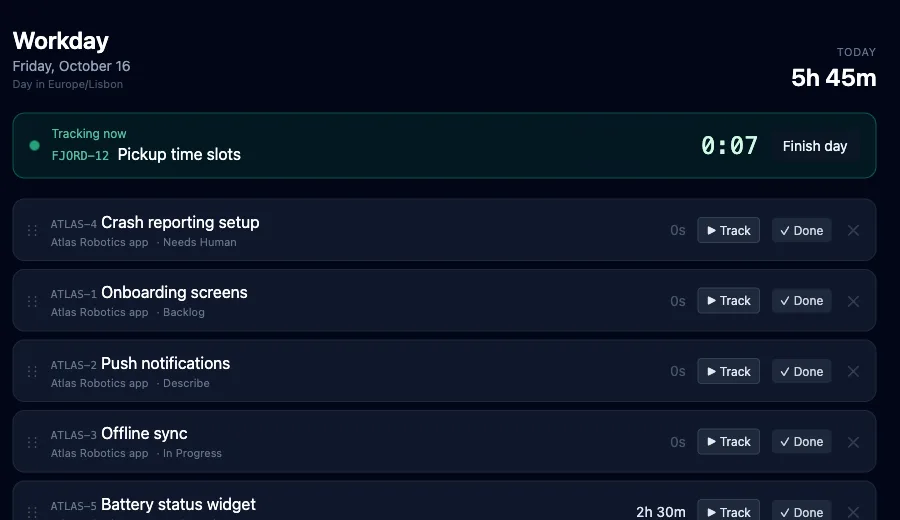
  • Workday: today's tasks in one list with Track and Done
  • Forgot to stop? A reminder after 10 hours, an automatic stop at 12 by default
  • Add time by hand, mark it billable or not, leave a note
  • Hours by day, project and person, with a CSV export
loopertask.com/workday
The Workday page: the task being tracked right now and today's tasks with Track and Done
Invoices

An invoice in two clicks, not an afternoon

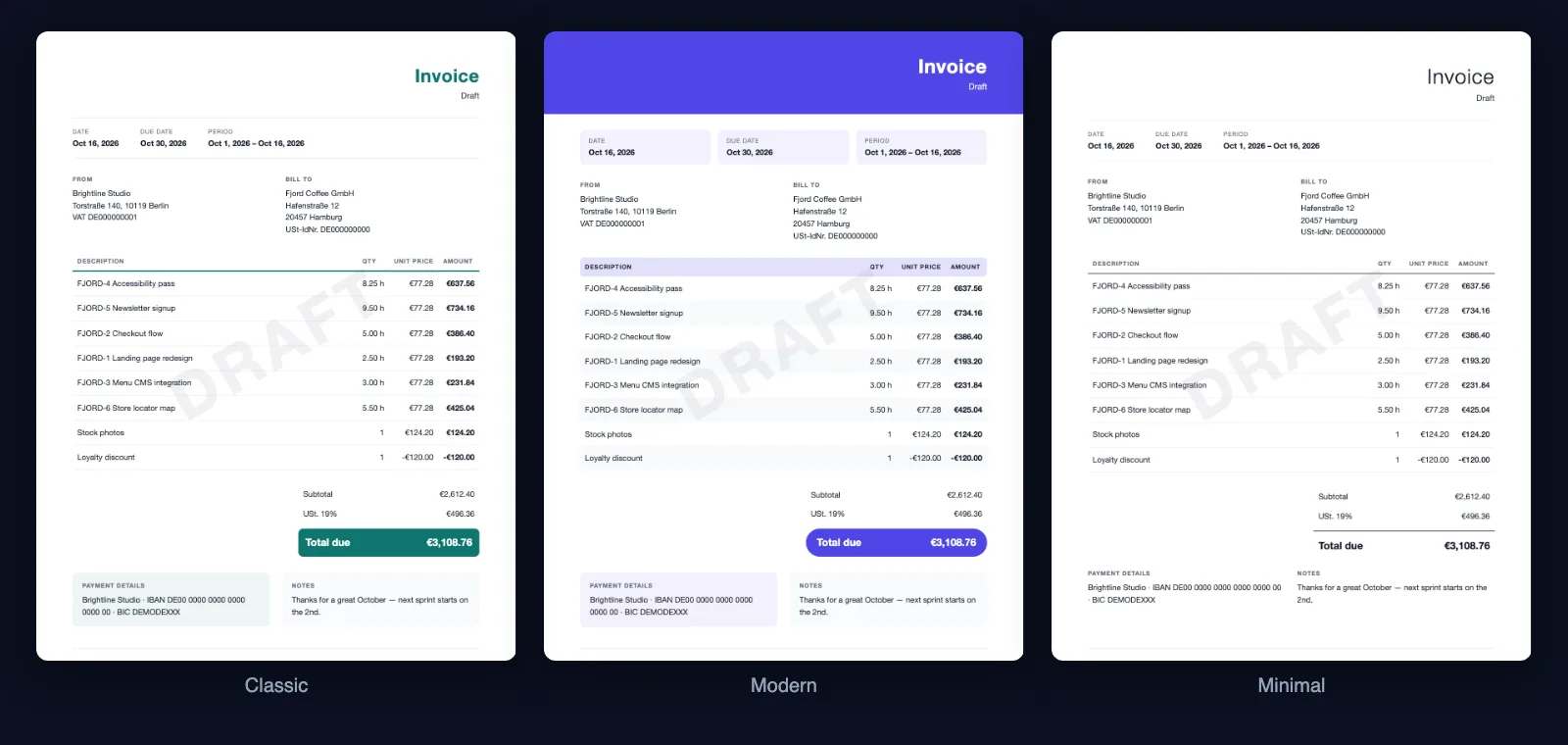
Choose the client and the period. LooperTask fills in the hours, and you edit the rest like a document, with a live preview next to it.

  • Lines by task, by person or one total for the period
  • Items, discounts and expenses next to the hours
  • Three templates, your logo and accent colour
  • The client's currency at a rate fixed for that invoice, with tax on top
  • Download a PDF, print it or export CSV; mark it paid when the money arrives
The same invoice in the Classic, Modern and Minimal templates
Margin

See what every project earns

Rates, markup and expenses sit next to the work, so the numbers are there without a spreadsheet.

  • An hourly rate per project, or a fixed monthly salary
  • Client markup as a percentage, per hour or a fixed client rate
  • Expenses once or recurring, on one project or shared
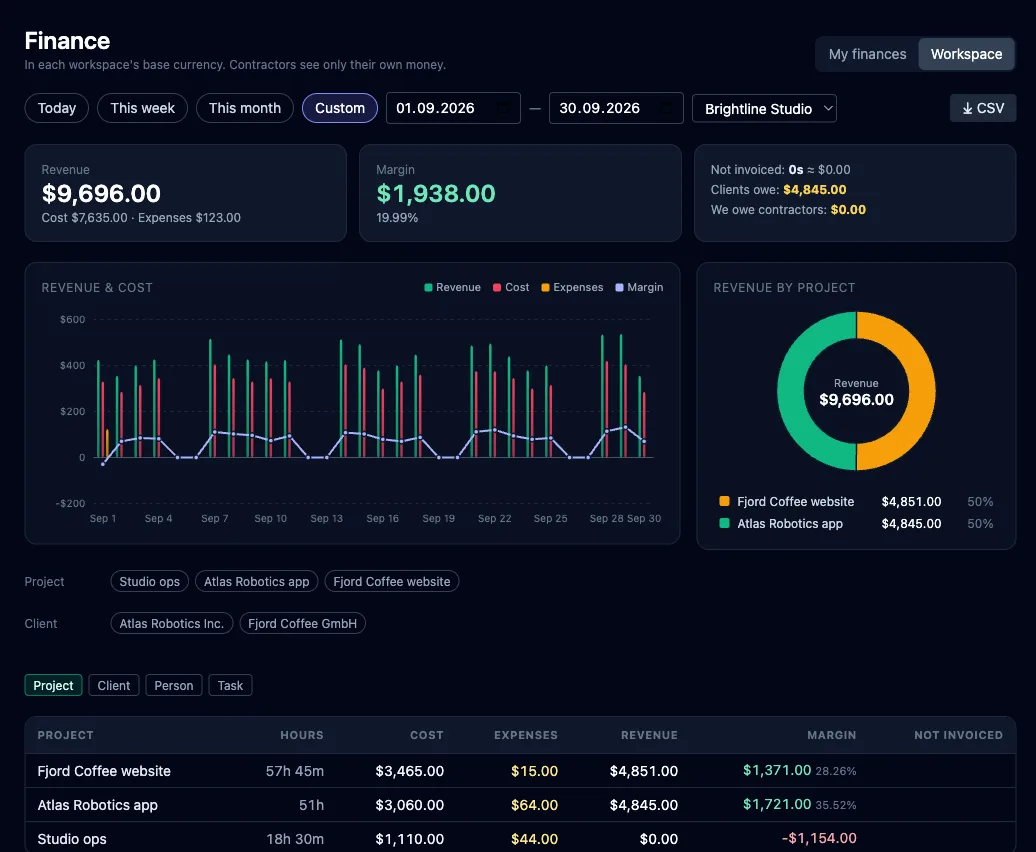
  • Revenue, cost and margin by project, client, person or task
  • Contractors see only their own pay; a project's money is shown to its owner
loopertask.com/finance
The finance overview: revenue, cost, expenses and margin, a daily chart and revenue by project
The board

A real kanban board under the hood

Hours and money attach to the work your team already manages here: projects, columns, subtasks, tags and deadlines.

👥

Your team and contractors

Invite people per project. Each of them sees their own rate, and contractors send their invoices to the studio from the same app.

📝

Forms → tasks, automatically

Shareable public forms turn client requests and bug reports into tasks, with attachments and no login for the sender.

🧱

Columns that fit your flow

Rename, add and reorder columns to match your process; subtasks, tags, deadlines and filters keep it in order.

AI agents

AI agents can take tasks too

Connect Claude Code, Cursor or any MCP client to your board. An agent claims a task, does the work and hands it back to a person for review. Agents don't run timers, so their work never shows up as billed hours.

Connect an agent
Works out of the box with Claude Code Cursor Windsurf Cline any MCP client
Pricing

Transparent prices, one-click cancellation

Free — forever. Paid — as your team grows.

Free
$0/forever
$0/forever
Try it on one project: track your time and send your first invoice.
  • 1 user, 1 project, up to 100 tasks
  • 100 MB storage, files up to 5 MB
  • A timer on every task and the Workday page
  • Invoices from tracked hours, as a PDF
  • Finance overview: revenue, cost and margin
  • Connect AI agents over MCP
  • Modules: time tracking, workday, time reports, rates & markup, invoices, finance
Solo
$9/mo
$7.50/mo
$90 billed yearly
save 16% vs monthly
For freelancers: unlimited projects, time tracking and invoices to your clients.
  • 1 user, unlimited projects and tasks
  • 60 GB storage
  • Time tracking on tasks, in Workday and in the browser extension
  • Invoice builder: 3 templates, your logo, documents in EN/DE/RU, PDF
  • Clients in their own currency, tax on every invoice
  • Expenses and margin per project
  • AI agents over MCP, public forms and a public board
  • Modules: time tracking, workday, time reports, rates & markup, invoices, finance

All plans →

Questions studios ask

QWho is LooperTask for?

Studios, agencies and small teams that bill clients by the hour. People and contractors track time on tasks, and the owner turns those hours into invoices and sees the margin.

QDo my employees need a separate time tracker?

No. Every task has a Track button, and the Workday page and the browser extension start the same timer. The hours show up on the task, in the time reports and on the next invoice.

QCan I bill a client in their own currency?

Yes. Each client has a currency. When it differs from your workspace's, you enter the exchange rate once and it stays fixed in that invoice.

QWhat happens to hours once they're on an invoice?

They're locked as soon as they're on an invoice, even a draft, so the invoice and the time records always agree. Remove the line from the draft and they're editable again. An issued invoice gets a number and can only be voided.

QWho can see rates and margins?

A project's numbers are shown to its owner who runs the workspace. Contractors see only their own rate and invoices; other people on the board see neither.

QAre AI agents' hours billed?

No. Agents can't run a timer, so only people's hours reach invoices. Agents still work tasks on the same board and hand them back for review.

Track this week. Invoice on Friday.

Create a board, invite your team and let a week of tracked hours turn into your first invoice.